
If you've followed our Google Business Profile guide, you've done the hard part. You're on the map. Now comes the thing that quietly does most of the selling for you: your reviews.
Unfortunatly, most people on the island who could be leaving you a glowing review never do. Not because they weren't happy, but because nobody asked, and the moment passed. This guide is going to help you fix that. By the end you'll know how to ask without feeling like a nuisance, how to make leaving a review take one tap, and what to say when a review lands.
Think about the last time you booked a tradesperson, a garage, a restaurant, a holiday, or an activity. You probably checked what other people said first. Your customers are no different. A business with a steady stream of recent, genuine reviews tells a stranger "this person is good at what they do" faster than anything you could say about yourself.
And reviews aren't a nice-to-have any more. They're the deciding factor. The numbers are stark, and they're getting more stark every year:
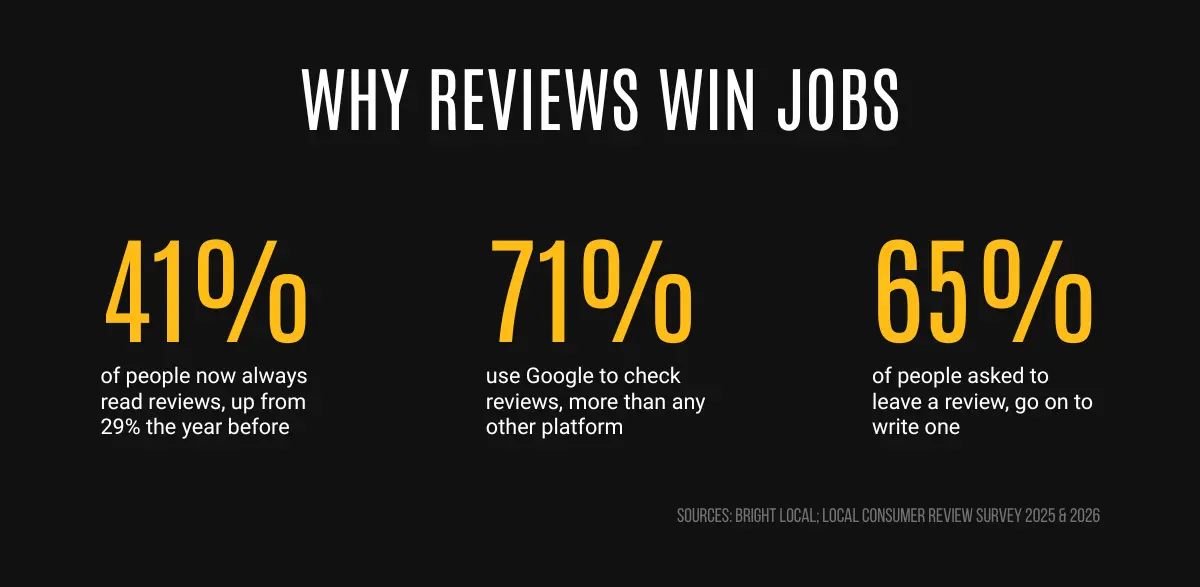
That last number is the one to burn into your memory. Most people will happily leave a review. They just need to be asked, and asked at the right moment. The businesses winning on reviews aren't lucky. They've simply made asking their customers a habit.
The single biggest mistake is waiting. You finish the job, everyone's pleased, and you think "I'll text them about a review later." Then they get on with their day and the moment's gone.
So don't wait. The best time to ask is the moment the work's done and the customer is standing there, visibly pleased with it. That's when a "would you mind leaving us a quick review?" feels natural, not pushy.
Two ways to ask that don't feel awkward:
The trick that makes all of this work is removing the friction. Few people are going to open Google, search your business name, scroll, and hunt for the review button. You have to hand them a link that drops them straight onto the review screen.
Google gives every business a short link that takes a customer straight to the "leave a review" box. You collect it once, save it, and reuse it forever. You can also get a QR code customers can scan. Here's the current way to find them.
One thing worth knowing: the QR code can currently only be generated on a computer, not on your phone.
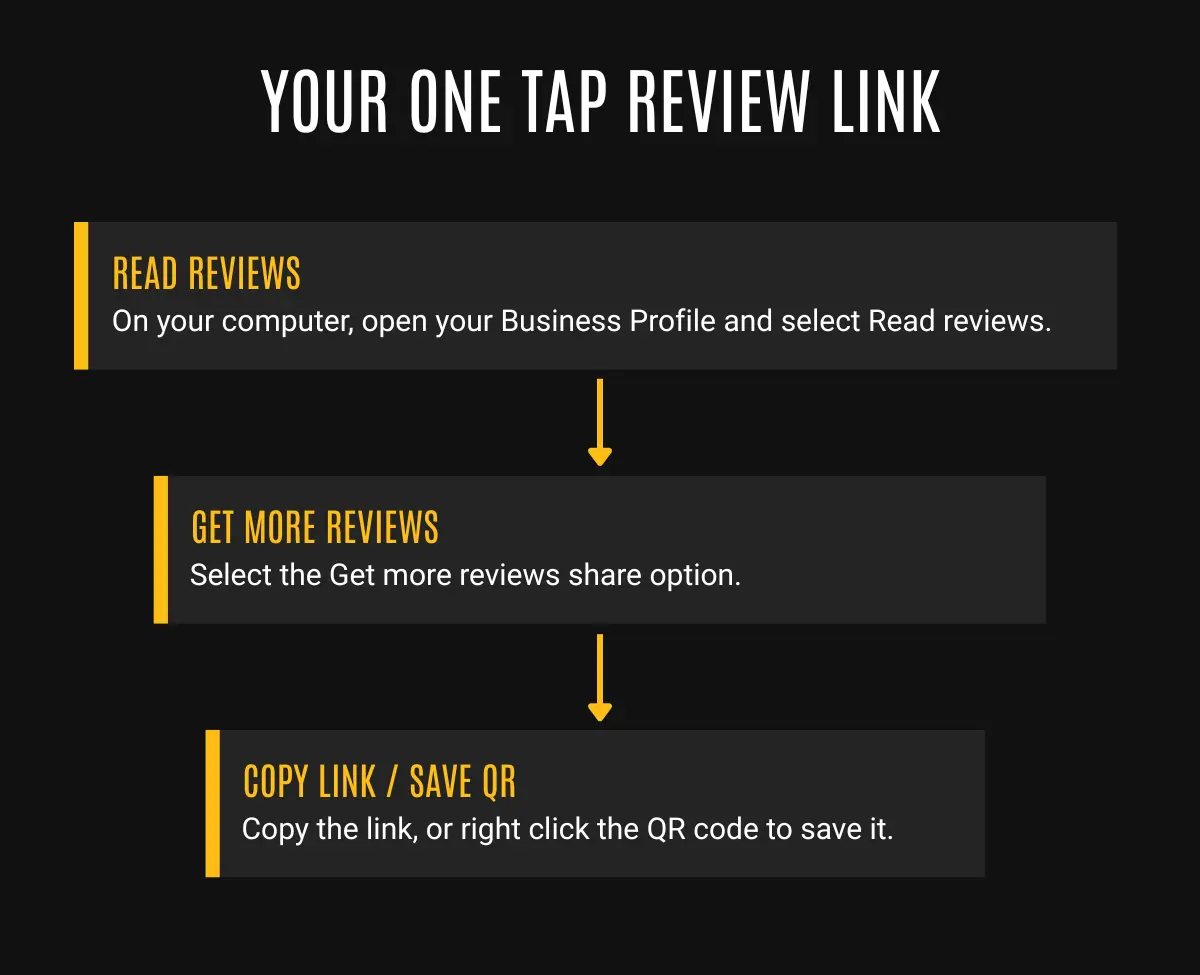
Once you've got that link, asking becomes effortless. A customer's pleased, you send off a text with the link, they tap it, two taps later you've got a five-star review. The whole thing takes them under a minute.
Keep it short, warm, and make it obvious it'll take them seconds. Something along the lines of:
"Hi Sarah, thanks again for having us, really glad you're happy with the bathroom. If you've got a spare minute, a quick Google review would mean a lot, it genuinely helps us out. Here's the link: [your link]. No worries at all if you're busy. Thanks, John."
The structure is: thanks them, be specific to their job, be honest about why it helps, include the link, and give them an easy out so there's no pressure. Note: people help more when they don't feel cornered.
Don't offer anything in return for a review. No discounts, free extras, or entries into a prize draw. Not only is this against Google's rules, which means your reviews could be removed or your profile restricted, but incentivised reviews often sound less genuine. And, once word gets around that you're offering incentives, people may no longer trust your business.
The businesses with loads of reviews aren't doing anything clever. They've just made asking automatic, so it happens on every job without them having to remember.
A handful of reviews a month quietly compounds. In a year, you're the business with thirty recent reviews while your competitor has four from 2021.
Getting reviews is half the job. Replying to them is the other half, and most people don't bother. That's a gift, because it's where you can stand out.
Why it's worth it: people read your replies, not just the reviews. A good reply shows future customers that there's a real, attentive person behind the business. And how you handle a bad review tells them even more.
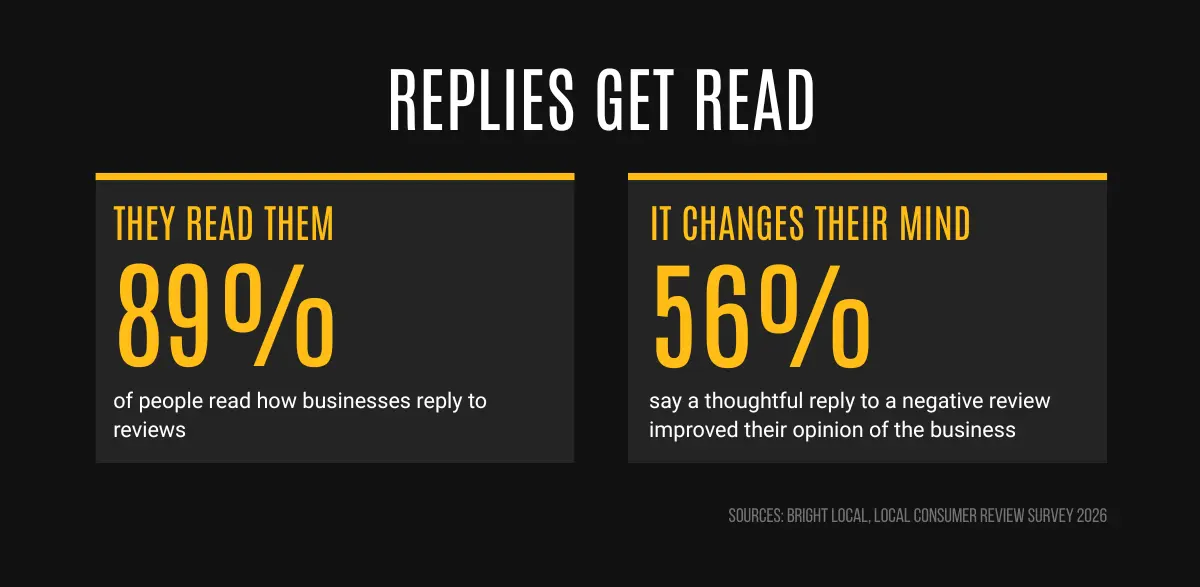
Read that second stat again. A calm, decent reply to a bad review can win you the next customer.
Replying to a good review. Keep it short, warm, and specific. Use their name, mention the job, say thanks. E.g. "Thanks Sarah, it was a pleasure sorting the bathroom out for you, enjoy it." That's it, ten seconds, and it looks great to everyone scrolling past.
Replying to a bad review. The instinct is to defend yourself or fire back. But arguing looks far worse to onlookers than the complaint ever did. Instead:
If the review is genuinely unfair, isn't even your customer, or is just an angry rant, then that may require a slightly different response. We'll cover that properly in its own guide. For most reviews, the simple rules above are all you'll ever need.
So that's reviews. Ask every happy customer while they're still smiling, hand them a one-tap link so it's no effort, never offer anything in return, and reply to every single one. Having a large number of reviews is super high leverage and will help amplify any advertising you do on platforms like Meta. If you're looking to get into advertising next, check out our introduction to Meta advertising guide.
.png)